 kudhub
History and recovery
Saved changes include your files and data. Compare earlier work or restore just the part you need.
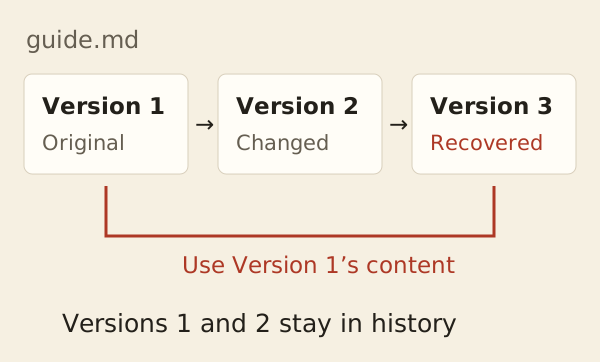
“Show what changed in the guide. Restore the previous version of that file only.”
- Inspect: look back without changing current work.
- Recover: restore a file, folder, selected rows, or the whole workspace.
- Republish: point your website to an older published release.
Open Activity in account management to review saved changes and runs. A failed run may still contain completed actions.
Technical details
Branches and releases
Use main for ordinary work; inspecting history needs no branch. Separate branches never merge automatically. Bookmarks are temporary comparison points; releases are immutable. Recovery adds a revision rather than deleting later history.
Branch selection lasts for one SSH session. Submit branch selection and whole-workspace recovery separately from subsequent work.
What survives a failure
Pending file and SQL changes commit together or are discarded together. Publication and history actions run separately or after that commit. Their earlier successes remain if a later action fails; displayed output cannot be recalled.
What Activity retains
- Actor, committed actions, outcome, and revisions for historical inspection.
- Prepared SSH/MCP source, even for read-only or failed runs. Requests rejected before preparation have no retained source.
- Foreground output and separate standard input are not retained. Jobs retain bounded output.
- Source-table comparisons show saved definitions, not live remote rows.
Storage-full accounts can still inspect existing evidence; it is not automatically deleted to make room.
Agent reference: kud history reference; workflows: kud guide recover and kud guide release.