 kudhub
Work with data
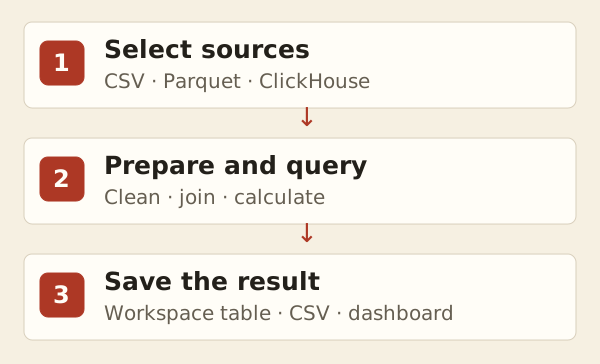
Ask your assistant to clean, combine, analyze, and export data inside your workspace.
“Combine these orders, flag duplicates, and export revenue by country. Keep the source unchanged.”
Tell it the source, the question, and whether it may change existing data. Explain dates, units, and identifiers such as codes with leading zeroes.
Results can become tables, CSV files, or dashboard components. Earlier saved data can be compared or recovered. For a lasting copy of remote data, ask the assistant to save the results locally.
See query tables or use a background job for a long analysis.
Technical details
Writes and timeouts
Files and SQL changes commit together. A query timeout cancels the submitted program, discards pending changes (including exports), and prevents later commands or publication hooks from running.
History and remote data
Historical queries are read-only and can run alongside current writes. Recovery explicitly copies selected rows into current data. File tables use the selected file revision; ClickHouse queries still read live remote data. See query tables.
Large queries
Ask the agent to profile slow queries and retain summaries for repeated dashboard reads. Profiling consumes the full result but reports timing, row count, and the query plan without displaying rows. Long programs can use background jobs.
Agent reference: kud sql --help; supported CSV/Parquet summary helpers: kud guide analytics.